 |

|
|
|
|

Good: Any to Icon Pro provides you with a wizard-style converter for producing attractive Windows or Mac OS icons from images. Additionally, it allows extraction of icons from libraries and saving them as i... (this pertains extract, image, picture, jpeg, cursor, bitmap, convert, converter, wbmp, icon, ...) | Any to Icon 3.51 [Home] - by: Aha-Soft - Download 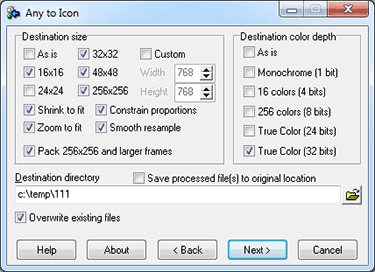 Click to enlarge Some words about Any to Icon: If what you crave for is a pain-free ability to create your own icons, then Any to Icon Pro may be the way to go. This slim application provides you with a handy conversion wizard to produce multi-resolution Windows icons from images and Mac OS icons. Images may come in a variety of formats, including BMP, WBMP, JPEG, GIF, PNG, PSD, TIFF, XPM, XBM, ANI, and CUR. In addition to icon creation, Any to Icon Pro gives you an extra ability to extract icons from folders and libraries to save them as individual icons in folders of your choice. Creating icons with Any to Icon Pro is remarkably easy and does not require any advanced knowledge of computers, or graphic design. The program offers you a wizard that guides you through all icon conversion stages in a point-and-click fashion. Simply select a file, or a folder with images, customize icon output settings that include icon size, color depth, transparency, and specify a destination folder. Based on these settings, the converter automatically produces an icon or a set of icons in a blink of an eye. For your convenience, Any to Icon Pro supports drag-and-drop for adding image files from Windows Explorer with a mouse. News, new features for this Major Update:
User's remarks, reviews, comments (Add your comment / review) | Download size: 5636 Kb Date: 12/09/2011 Program home Install/Uninstall: Install and Uninstall OS: WinXP, Windows2000, Windows2003, Win98, WinME, WinNT 4.x, Win95 Sys requirements: 32MB RAM, Pentium-233 MHz, 5MB HDD Language: English |
See also in Desktop Enhancements: Fonts Icons and Cursors
|


 Free Download: