 |

|
|
|
|

Good: Icon to Any is a wizard that lets you convert any Windows icon to an image, or a cursor. Such images can further be used on webpages. The tool supports a great variety of graphic formats, including IC... (this pertains image, picture, jpeg, cursor, bitmap, convert, converter, ahasoft, aha soft, icon, ...) | Icon to Any 3.20 [Home] - by: Aha-Soft - Download 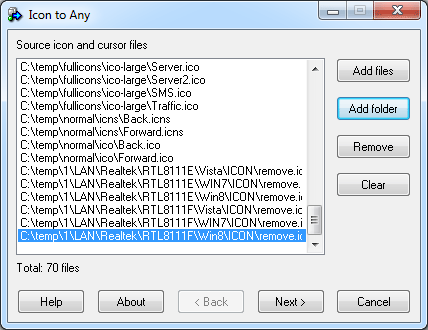 Click to enlarge Some words about Icon to Any: Icon to Any is a smart tool that lets you convert any icon, or cursor to an image. This image can be used as a design element on a webpage. Conversion is done via a simple wizard that restricts all your efforts to a few mouse clicks. Simply select a file, or a folder to convert, specify the destination image formats by checking appropriate checkboxes, choose the size, color depth of the output and specify background colors to replace a transparent color of an icon. Icon to Any will do the rest in a blink of an eye. The output image may be saved in a variety of graphic formats, including BMP, WBMP, JPEG, PNG, GIF, ICO, CUR, TIFF, PSD, XPM, XBM and RC. Thanks to the intuitively transparent interface, you can start using Icon to Any right out of the box without having to spend time on reading any technical documentation. News, new features for this Major Update:
User's remarks, reviews, comments (Add your comment / review) | Download size: 4949 Kb Date: 12/08/2011 Program home Install/Uninstall: Install and Uninstall OS: WinXP, Windows2000, Windows2003, Win98, WinME, WinNT 4.x, Win95 Sys requirements: 8MB RAM, Pentium-100 MHz, 2MB HDD Language: English |
See also in Desktop Enhancements: Fonts Icons and Cursors
|


 Free Download: