 |

|
|
|
|

Good: - open any picture or photo files - double click at a desired point and enter text, font, colors for a label - drag any labeled point to desired place - apply desired settings for all labels at ones -... (this pertains Google Earth, photo, picture, point, label, ...) | VIMap 1.2 [Home] - by: Valeri Vlassov - Download 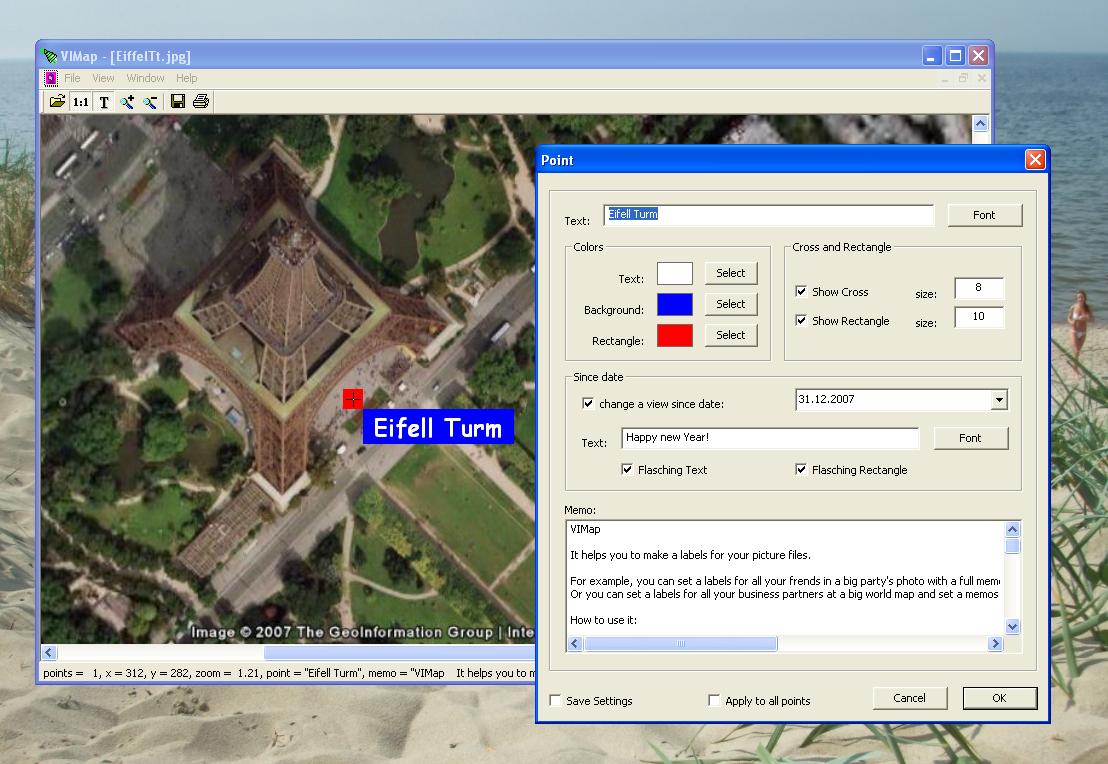 Click to enlarge Some words about VIMap: It helps you to make a labels for your picture files. For example, you can set a labels for all your frends in a big party's photo with a full memos for every one and with a flasched text at every one's birthday. Or you can set a labels for all your business partners at a big world map and set a memos for all of them (phones, addresses etc), and remaining texts since needed dates for every one. How to use it: - open any picture file (jpg, bmp, etc): a map from Google Earth, a scool-frends photo, a scanned country or world map etc - change piture-window's size to adjust the picture or press "1:1" button to see the picture in a full size - double click at a desired point - you will see the "Point" Dialog - set up text, font, colors, cross and rectangle for that point - add a memo text for that Point - you can set a new text with a new font since any date in the Future (text and rectangle can be shown flasched or not) - you can apply font and colors settings for all entered Points at ones - you can save font, colors, cross and rectangle settings for next time - press OK and the new label will be shown at a picture - your original picture files will be not changed, only a small new files *.map will be created for every picture file with a labels - make the same for any other points in a picture - next time, when you open that picture file, all setted labels will be shown again - save or print a picture with added labels - you can open many pictures together Hints: - use left mouse double click at a label-cross to change settings for an existing label - use right mouse double click at a label-cross to remove an existing label - drag any label by label-cross to change a placement of a label - change the picture's window size to adjust a printing size of a picture News, new features for this Minor Update:
User's remarks, reviews, comments (Add your comment / review) | Download size: 4667 Kb Date: 01/28/2011 Program home Install/Uninstall: Install and Uninstall OS: Win98, WinME, Windows2000, WinXP, Windows2003, Windows Vista Home Basic Sys requirements: None Language: English |
See also in Graphic Painting and Drawing: Utilities
|


 Free Download: