 |

|
|
|
|

Good: A simple and powerful classroom monitoring and management application that allows you to see live screens of remote computers or show you screen to students. You can take control of a remote computer ... (this pertains activity, software, remote, education, network, monitor, remote, netmon, classroom management, classroom monitoring, ...) | Classroom Spy Professional 3.9.31 [Home] - by: EduIQ.com - Download 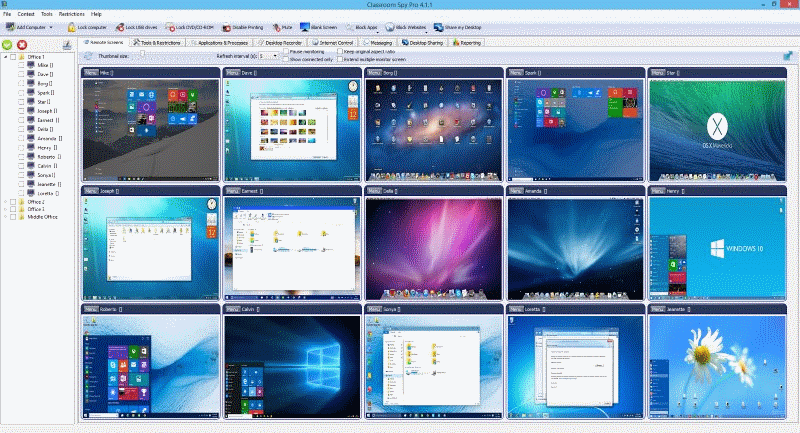 Click to enlarge Some words about Classroom Spy Professional: A simple and powerful classroom monitoring and management application that allows you to monitor live screens of remote computers or show you screen to students. You can take control of a remote computer by controlling the mouse and keyboard. This way, you can always watch what users are doing on the remote computer. Additionally you can also record student's screens. Several tools allow you to turn off, restart, hibernate.... remote computers with one click. Starting program on remote computers is easy. What is it useful for? For classroom monitoring and recording your students activities on remote computers; For monitoring students in the classroom to achieve better discipline or, just to assist them when they are in trouble (by using the remote control feature); For administrating all computers just from one location - your computer; For presenting your screen to students; For locking students computers while they are waiting for further instructions or assignments; Helping your students by showing your desktop to them; Turning off, restarting, .... remote computers with one click; What are the major benefits of using Classroom Spy Professional? Installation and use of the application is very easy since all of the functions can be accessed with a few mouse clicks; You have complete control over what remote users are doing; You can prevent internet browsing on remote computers. Application provides you with a live picture of the remote computer screens. The live screen (due to some optimizations) does not use a high bandwidth, but even when the lower network bandwidth is required the refresh interval can be enlarged using one mouse click; You can make the presentation by showing your live screen to students; Application allows you to take over the remote computer by controlling its mouse and keyboard; The remote computers' screens are represented in the table with a customizable number of rows as thumbnails. News, new features for this New Release:
User's remarks, reviews, comments (Add your comment / review) | Download size: 13543 Kb Date: 11/03/2015 Program home Install/Uninstall: Install and Uninstall OS: WinXP, Windows2000, Windows2003, Windows Vista Ultimate, Windows Vista Ultimate x64, Windows Media Center Edition 2005, Windows Vista Starter, Windows Vista Home Basic, Windows Vista Home Premium, Windows Vista Business, Windows Vista Enterprise, Windows Vista Home Basic x64, Windows Vista Home Premium x64, Windows Vista Business x64, Windows Vista Enterprise x64 Sys requirements: P4, 1 Gb Ram Language: English |
See also in Home and Education: Teaching Tools
|


 Free Download: