 |

|
|
|
|

Good: pdf-FormServer is the easiest software solution to save filled out PDF forms. You can save either as FDF, XFDF (for further electronic processing) or directly to PDF. No need to mention that all forms... (this pertains save, content, form fields, local, server, Acrobat, PDF files, save form fields, ...) | pdf-FormServer 6.0.2 [Homepage] - by: UNIVERSE Software GmbH - Download 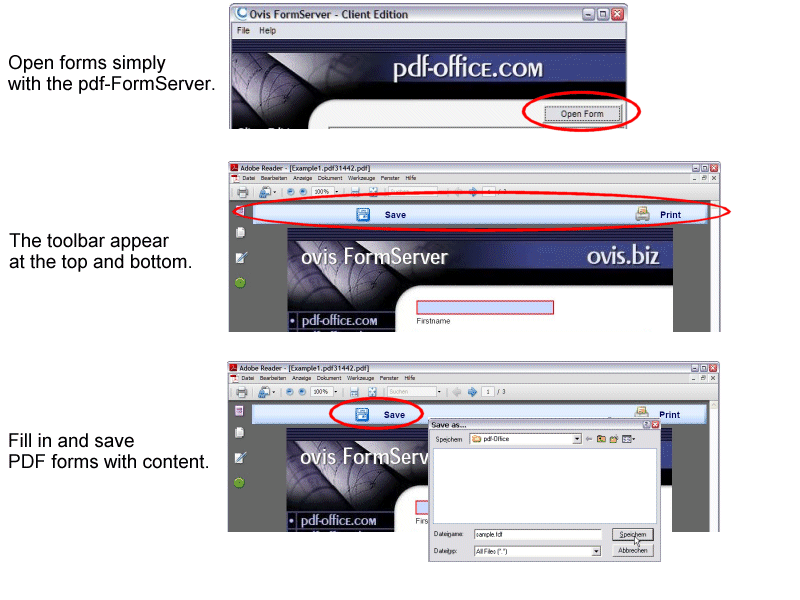 Click to enlarge Description: The easiest way to save filled out PDF forms and keep form fields editable.Who has not come across the situation: You complete a PDF form in Acrobat Reader and when it comes to saving your data, nothing happens. Or worse: You close the program and all your data is lost. The reason for this is: Acrobat Reader cannot save any form field data! This is not only time consuming but also very unpleasant.pdf-FormServer eliminates this problem in a very easy way! Once this software solution has been installed, all filled out PDF forms can be saved locally either as FDF, XFDF (for further electronic processing) or directly to PDF. No need to mention that all forms that have been filled once can be read again with the included data and also altered at a later date or send by email.Handling is extremely easy.Just start pdf-FormServer and open a PDF form. You will find a save button at the beginning and at the end of the form. You then can fill out and save the form with all input.pdf-FormServer is the leading tool for all people who have to handle any kind of PDF forms.+++ Save the data that you enter into a PDF form, fill it in offline +++ Send the form data as an e-mail attachment +++ Save form data to a separate FDF, PDF or XFDF file +++ Import form data from a FDF, XFDF or XML file +++ Silent Mode to work unnoticed in background +++ 100 % Adobe kompatible +++ PDF/A standard +++ Winner of the Innovation Award 2007 +++ Recent changes in this New Release:
User's Reviews, Comments (Add your comment / review) | File size: 13183 Kb Date: 12/15/2008 Homepage Install support: Install and Uninstall OS: WinNT 3.x, WinNT 4.x, WinXP, Windows2000, Windows2003, Windows Vista Starter, Windows Vista Home Basic, Windows Vista Home Premium, Windows Vista Business, Windows Vista Enterprise, Windows Vista Ultimate, Unix, Linux, Mac OS X, Mac OS X 10.4, Mac OS X 10.5, Java Sys requirements: Language: English, German |
See also in Multimedia and Productivity: Autorun CD, Business Cards and Labels
|


 Free Download: