 |

|
|
|
|

Good: Tipard Video Enhancer enables you to enhance your video quality from a lower resolution to any higher resolution. It allows you to upscale resolution, optimize brightness and contrast, and remove nois... (this pertains Clip Video, Convert Video, Rotate Video, Video Enhancer, ...) | Tipard Video Enhancer 9.2.36 [Home] - by: Tipard Studio - Download 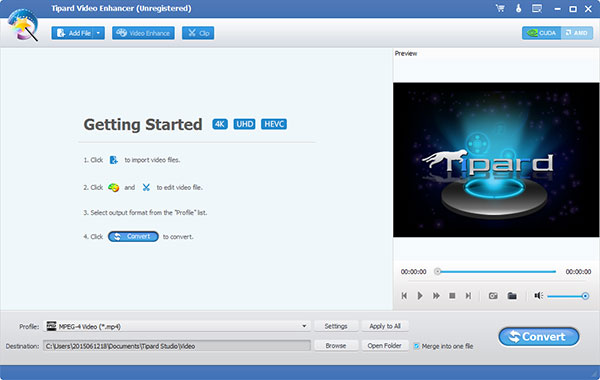 Click to enlarge Some words about Tipard Video Enhancer: Tipard Video Enhancer is able to enhance your video quality greatly. It can also rotate or flip your video direction. Besides, this video enhancement software can edit your video with the function of clipping, cropping, and adding watermark. Apart from that, it can convert your video to MP4, MOV, M4V, MKV, AVI, WMV, TS and others. Key functions: 1.Enhance video quality Tipard Video Enhancer can enhance your video quality greatly. This video enhancement software can upscale resolution of the video, optimize brightness and contrast of the video, and remove video noise to make video quality better. 2.Rotate or flip video direction With Video Enhancer, you can rotate the direction of the video such as rotate 90 clockwise and rotate 90 counterclockwise. It also flips the video direction by horizontal flip and vertical flip. 3.Convert video to MP4, MKV, AVI, WMV and more This Video Enhancer can convert your video to 4K H.265/HEVC Video, 4K H.264/MPEG-4 AVC, 4K TS, 4K AVI, 4K H.264 FLV, 4K MKV and other 4k Ultra HD. Meanwhile, it can also convert video to MTS, TS, M2TS, HD MPG, HD MPEG, HD MP4, HD WMV, QuickTime HD MOV and more 1080p HD video. 4.Edit your video effect Tipard Video Enhancer can set the 3D effect as Side by Side (Half-Width/Full), or Top and Bottom (Half-Height/Full). Besides, it is able to crop the video frame at your disposal, adjust the Brightness, Saturation, Contrast, Hue and Volume of your video, and add text or watermark to the screen of the video. It can also clip your video into several segments. News, new features for this Major Update:
User's remarks, reviews, comments (Add your comment / review) | Download size: 39610 Kb Date: 07/29/2022 Program home Install/Uninstall: Install and Uninstall OS: Win2000, WinXP, Win7 x32, Win7 x64, Windows 8, Windows 10, WinServer, WinOther, WinVista, WinVista x64 Sys requirements: 1.2GHz Intel or AMD CPU, or above; 1G RAM or more. Language: English |
See also in Multimedia and Productivity: Video Editors and Authoring
|


 Free Download: