 |

|
|
|
|

Good: Long Path Fixer is a FREE utility for moving, copying, deleting and renaming files and folders with Very Long Paths, that is paths longer than the Windows API can handle (i.e. MAX_PATH: 259 real chara... (this pertains rename, delete, move, copy, 32767 characters, MAX PATH, path too long error, path too long, long path, path, ...) | Long Path Fixer 0.9 [Home] - by: corz.org - Download 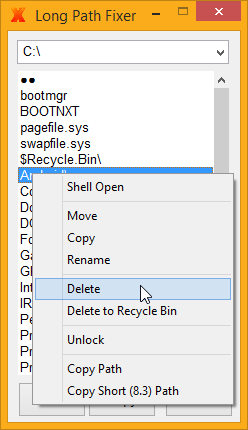 Click to enlarge Some words about Long Path Fixer: Long Path Fixer is a FREE utility for moving, copying and deleting files and folders with Very Long Paths, that is paths longer than the Windows API can handle (i.e. MAX_PATH: 259 real characters). Long Path Tool can deal with paths up to 32,767 characters long. Problem Solved! Long Path Fixer presents you with a simple list of files and folders in the current directory. You can drag and drop files or folders onto it and it will navigate directly to path of whatever you dropped. From there, you simply click on the file or folder you want to move, copy, delete or rename, and click the appropriate button or menu item. Image of Long Path Fixer context menu showing open and unlock optionsJust like Explorer windows, F5 refreshes the list. There is a drop-down menu at the top with all your available drives listed, so you can start navigating from there, use your up/down arrow keys to switch drives and so on. Having said that, it's usually easier to drag-and-drop items directly from Explorer. You can also have Long Path Fixer in your explorer directory context menu, and an option to enable this is available from Long Path Fixer's System Tray menu (see image below). This way you can right click files and folders in Explorer and send them straight to Long Path Fixer, which will launch with your selected folder in view. Alternatively, you can keep a shortcut in your SendTo menu, and send items from there. Or even drag and drop items directly onto Long Path Fixer, or a shortcut to it. If you launch Long Path Fixer with no path on the command line (by clicking it directly), Long Path Fixer will remember your previous folder and start there, same goes for whatever destination folder you last chose to copy/move an item to - that's where the dialog will open next time around. Anything to save a few precious seconds! News, new features for this Major Update:
User's remarks, reviews, comments (Add your comment / review) | Type: Freeware Download size: 435 Kb Date: 07/24/2014 Program home Install/Uninstall: No Install Support OS: WinXP, Win7 x32, Win7 x64, Windows 8, Windows2003, Windows Server 2003, Windows Server 2008, Windows Server 2008r2, Windows Server 2012, Windows Media Center Edition 2005, WinVista, Windows Vista Starter, Windows Vista Home Basic, Windows Vista Home Premium, Windows Vista Business, Windows Vista Enterprise, Windows Vista Ultimate, WinVista x64, Windows Vista Home Basic x64, Windows Vista Home Premium x64, Windows Vista Business x64, Windows Vista Enterprise x64, Windows Vista Ultimate x64 Sys requirements: Unicode-capable Windows system (XP+) Language: English |
See also in Utilities and Hardware: File and Disk Management
|


 Free Download: