 |

|
|
|
|

Good: Is the personal information on your computer safe? Do you store private, sensitive files in unprotected folders? How can you safeguard your privacy and make your data impenetrable to prying eyes? Rela... (this pertains password protect USB flash drive, windows encryption, encrypt file, file encryption, file locking, folder locking, file lock, lock file, folder vault, lock folder, ...) | SensiGuard 3.2.1 [Home] - by: WebMinds, Inc. - Download 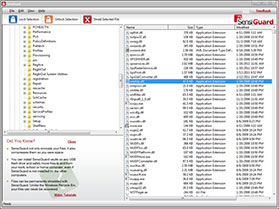 Click to enlarge Some words about SensiGuard: Without Encryption, Your Computer Can Become Your EnemyIs the personal information on your computer secure? Do you have confidential documents sitting in unprotected folders? What would happen if your most private files fell into the wrong hands?Relax. SensiGuard is the fastest and the easiest way to protect files and folders on your PC and your USB flash drives.STAY IN CONTROL with SensiGuard file encryption software - the hassle-free way to protect your confidential data, such as documents, photos and personal information. SensiGuard provides robust file and folder encryption, which means that you will never have to worry about your private information leaking out. Your credit card data, personal emails, tax returns, photos and other private files will remain under lock and key.Making something complicated simpleEncryption is pretty heavy stuff and most encryption software is difficult to use, often requiring you to create special "folder lockers" or "virtual volumes" to hide your files. This forces you to reorganize your filing system and interferes with how you access your data. But SensiGuard is a different story. Despite employing the same powerful 256-bit AES encryption used by the big guys, the similarities stop there. SensiGuard is user-friendly and extremely easy to use.When you encrypt folders and files on your Windows XP, Vista or Windows 7 PC using SensiGuard, you know your data is safe.Money-Back GuaranteeIf you're not satisfied with SensiGuard for any reason during the first 30 days after your purchase, we'll give you a full refund without asking any questions. News, new features for this Major Update:
User's remarks, reviews, comments (Add your comment / review) | Download size: 5482 Kb Date: 05/18/2011 Program home Install/Uninstall: Install and Uninstall OS: WinXP, WinVista, WinVista x64, Win7 x32, Win7 x64 Sys requirements: Windows XP/Vista/7 Language: English |
See also in Utilities and Hardware: Security Encryption Digital Signature
|


 Free Download: