|
|
 |
|
 | ||
|
|
|
Want a better software to manage your Web site more quickly and efficently? Click here, and start saving time today!
Create both Websites and CD DVD product catalogs with a single professional tool: 
(BELOW!) FREE DOWNLOAD LINKS FOR: ImageDIG 2.0.7 RESUME/REVIEW BY CUTEAPPS: ImageDIG consists of three integrated modules which allow the user to convert 2D flat images into 3D (x,y,z) data or if a graph, convert the graph in image form into 2 dimensional numerical data. The third module is a full analysis plotting utility where the user can import either the 2D or 3D data saved above or import any number of columns of data from a file. The data can then be analyzed using several statistical functions and plotted. (description, more information, click here - Convert flat images to 2D/3D numerical data then plot and analyze) File size: 5788 Kb Free Download link 1: Click here to start the download for ImageDIG (then choose Save) Click here to start the download for ImageDIG (then choose Save)Free Download link 2: http://www.fnrf.science.cmu.ac.th/imagedig/install.exeWARNING: While we do our best to screen each file reviewed on CuteApps, we always suggest to scan the files with an antivirus before installing them (better safe than sorry). Also, the download link was working at the time of the inclusion in this archive and when we did the last test; it is provided by the software house and sometimes can be -temporarily- offline or so. Please contact us with the contact form to report difficulties, strange behaviors or persistent problems, and quote the program name or the number 137 . ImageDIG consists of three integrated modules which allow the user to convert 2D flat images into 3D (x,y,z) data or if a graph, convert the graph in image form into 2 dimensional numerical data for further analysis. The third is 2D analyis plotter.(Convert flat images to 2D/3D numerical data then plot and analyze)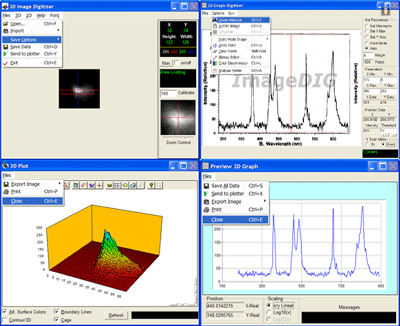 This is the download page for ImageDIG - ImageDIG consists of three integrated modules which allow the user to convert 2D flat images into 3D (x,y,z) data or if a graph, convert the graph in image form into 2 dimensional numerical data. The third module is a full analysis plotting utility where the user can import either the 2D or 3D data saved above or import any number of columns of data from a file. The data can then be analyzed using several statistical functions and plotted.ImageDIG was developed because other functionally similar programs (2D) either had a steep learning curve, incomplete or confusing to use. However, no other program includes an image to 3D numerical data converter and a general purpose x/y plotter.A variety of data analysis options are available in this module. Example images for tutorial purposes are supplied. This includes real world images of an electron beam for the 3D digitizer. Computer generated plots (linear, log, fractional, etc), scanned images from articles for the 2D digitizer, and ascii data files for the universal plotter. Graph processing functions include statistical analysis such as: Min/Max/Mean Fitting - Standard deviation, best fit, and curve fit. Curve fit includes: variable-order polynomial, logarithmic, exponential, power, inverse, spline, and moving averages Additional features include a built in bitmap editor, magnifier and spreadsheet style data viewer/editor for the 2D scanner module. Complete control of the graph windows such as Labels, Legends, Grids, Colors, etc through the Graph Toolbox. Import image from the clipboard or from a TWAIN compatible device directly into the 2D or 3D scanner image box including Web images.

|
|
||
 |
|
|
