|
|
 |
|
 | ||
|
|
|
Want a better software to manage your Web site more quickly and efficently? Click here, and start saving time today!
Create both Websites and CD DVD product catalogs with a single professional tool: 
(BELOW!) FREE DOWNLOAD LINKS FOR: Online Desktop Presenter 1.9.13.6 RESUME/REVIEW BY CUTEAPPS: Present your windows desktop via Internet to any other user without any problems of firewalls nor any other security related installations. Transmit your screen content online via Internet or Intranet for presentations, trainings, sales conversations etc. to one or several remote Internet users. Your screen content will be transmitted via FTP to your own web server or to free web space automatically and continously. (description, more information, click here - Windows desktop presentation via Internet without any problems of firewalls.) File size: 1511 Kb Free Download link 1: Click here to start the download for Online Desktop Presenter (then choose Save) Click here to start the download for Online Desktop Presenter (then choose Save)Free Download link 2: http://www.infonautics.ch/presenter/OnlineDesktopPresenterSetupDE.zipWARNING: While we do our best to screen each file reviewed on CuteApps, we always suggest to scan the files with an antivirus before installing them (better safe than sorry). Also, the download link was working at the time of the inclusion in this archive and when we did the last test; it is provided by the software house and sometimes can be -temporarily- offline or so. Please contact us with the contact form to report difficulties, strange behaviors or persistent problems, and quote the program name or the number 12544 . Present your windows desktop online via Internet to any other user without any problems of firewalls. Transmit your screen content via Internet or Intranet for presentations, trainings, sales conversations etc. to one or several remote users.(Windows desktop presentation via Internet without any problems of firewalls.)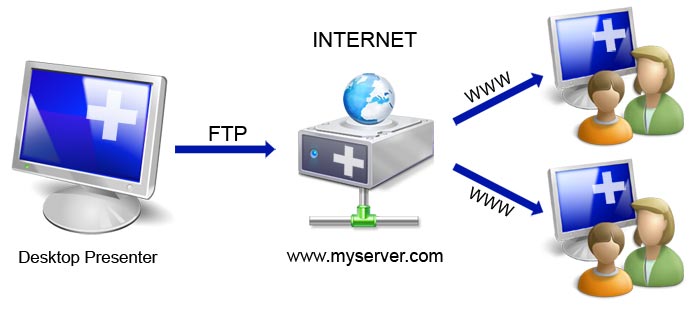 This is the download page for Online Desktop Presenter - Present your windows desktop via Internet to any other user without any problems of firewalls nor any other security related installations. Transmit your screen content online via Internet or Intranet for presentations, trainings, sales conversations etc. to one or several remote Internet users.
Your screen content will be transmitted via FTP to your own web server or to free web space automatically and continously. Your remote dialog partners such as customers, partners, colleagues and co-workers can follow your desktop presentation system-independent (Windows, Mac, Linux etc.) only by opening the corresponding web address in their browser; no additional installation of any kind is needed on their side. Program Features - Data transmission of your Windows desktop in rapid sequences. - Supporting desktops spanning multiple monitors. - Possibility to show a partial screen region only. - Start/pause/stop of transmission of your desktop. - Setting of any possible subdirectory of a web server or web space accessible by FTP. - Use of free web space if no own web server is available. - There is only about 300 KB space in a subdirectory on the web server needed, nothing else has to be installed additionally. - On Apache web servers the access can be additionaly restricted by a user login (htaccess). - Possibility to preview the image of the presentation as the remote Internet user will see it. - There can be shown any web address to the remote Internet user after the termination of the presentation. - Deletion of the presentation on the web server after termination of the presentation. System Requirements On presentator's side: Windows XP/Vista/7 Internet access (temporary or permanent) FTP access to a subdirectory of a web server (own or free web space) On remote Internet user's side: Any operating system with any browser (Javascript activated by default) Internet access (temporary or permanent) 
|
|
||
 |
|
|
