 |

|
|
|
|

Good: USB Network Gate is perfect solution in those cases when you need to work with some USB device, but cannot connect it directly to your local machine. It will also help you access and manage local USB ... (this pertains usb port over ethernet, share usb over network, usb over network, usb network sharing, share usb port over network, share usb port, usb device over network, share usb network, share usb device over network, share usb device over lan, ...) | USB Network Gate 7.0 [Home] - by: Eltima Software - Download 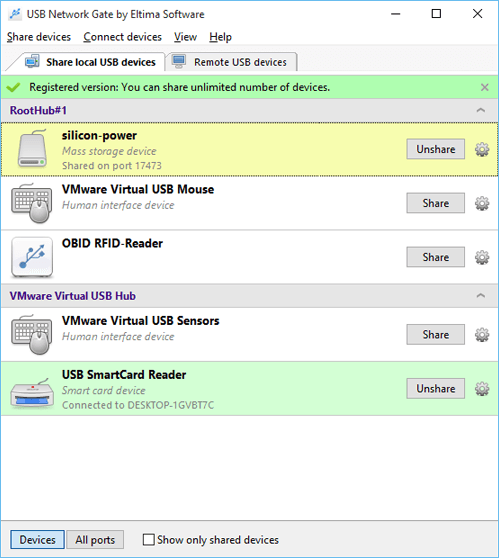 Click to enlarge Some words about USB Network Gate: With USB Network Gate you will never experience any issues accessing and using the USB devices that are plugged into remote computers. You can work with those devices as if they were physically connected to your local machine. All that is needed to do for that is install USB over Network Connector on the computer with USB device physically attached (server) and on the computer where you want to use this device (client). USB over IP Connector will do all the rest. No additional hardware needed! BTW you can choose whether Mac, Linux or Windows machine will be a client or a server. Not only this software allows accessing USB devices over Ethernet, but it's also suitable for servers and workstations virtualization. I.e. It will help you access and use local USB devices in a virtual session. It supports per-session isolation, i.e. that USB Network Gate allows assigning a USB device to specific user in their RDP session. Currently available for USB flash drives and USB cameras in testing mode. Since version 7.0 USB Network Gate supports per-session USB device isolation, supporting Windows 10 and ICA by Citrix.Thanks to USB over Network Connector you can easily work with USB devices on guest OS of such virtual environments as VMware ESX, Citrix XenDesktop, Microsoft Hyper-V, Windows Virtual PC, etc. With USB NEtwork Gate it's possible to work with any local USB devices in a remote session. It also allows you to integrate its useful functionality into your own software (OEM licensing). News, new features for this Major Update:
User's remarks, reviews, comments (Add your comment / review) | Download size: 4228 Kb Date: 12/10/2015 Program home Install/Uninstall: Install and Uninstall OS: WinXP, WinVista, WinVista x64, Win7 x32, Win7 x64, Windows2000, Windows2003, Windows 8, Windows 10 Sys requirements: Win2000, Win2003, WinXP, WinVista,Win7,Win8, Win10 Language: English |
See also in Internet and communication: Server applications
|


 Free Download: